
Back in 2021 I wrote about the problem that started this whole thing: rotate a normal map in Photoshop, GIMP, or any regular image editor, and you don’t get a rotated normal map — you get a broken one. Regular rotation just spins pixels around; it has no idea that the R/G/B channels in a normal map actually encode a direction in 3D space. The result is lighting that looks subtly (or not so subtly) inverted.
The original tool solved that by rotating the vectors, not just the pixels. That core idea hasn’t changed since — what you’re reading about now is V4, the latest step in a line that’s been quietly improving through V1, V2, and V3. Each old version stays live if you need it (/v1, /v2, /v3); the main link always redirects to whatever’s newest, which is V4 as of this post.
The short version
- Way more file formats: TGA, TIFF, and PSD now open directly, no conversion needed first
- The tool now warns you if what you dropped in doesn’t actually look like a normal map
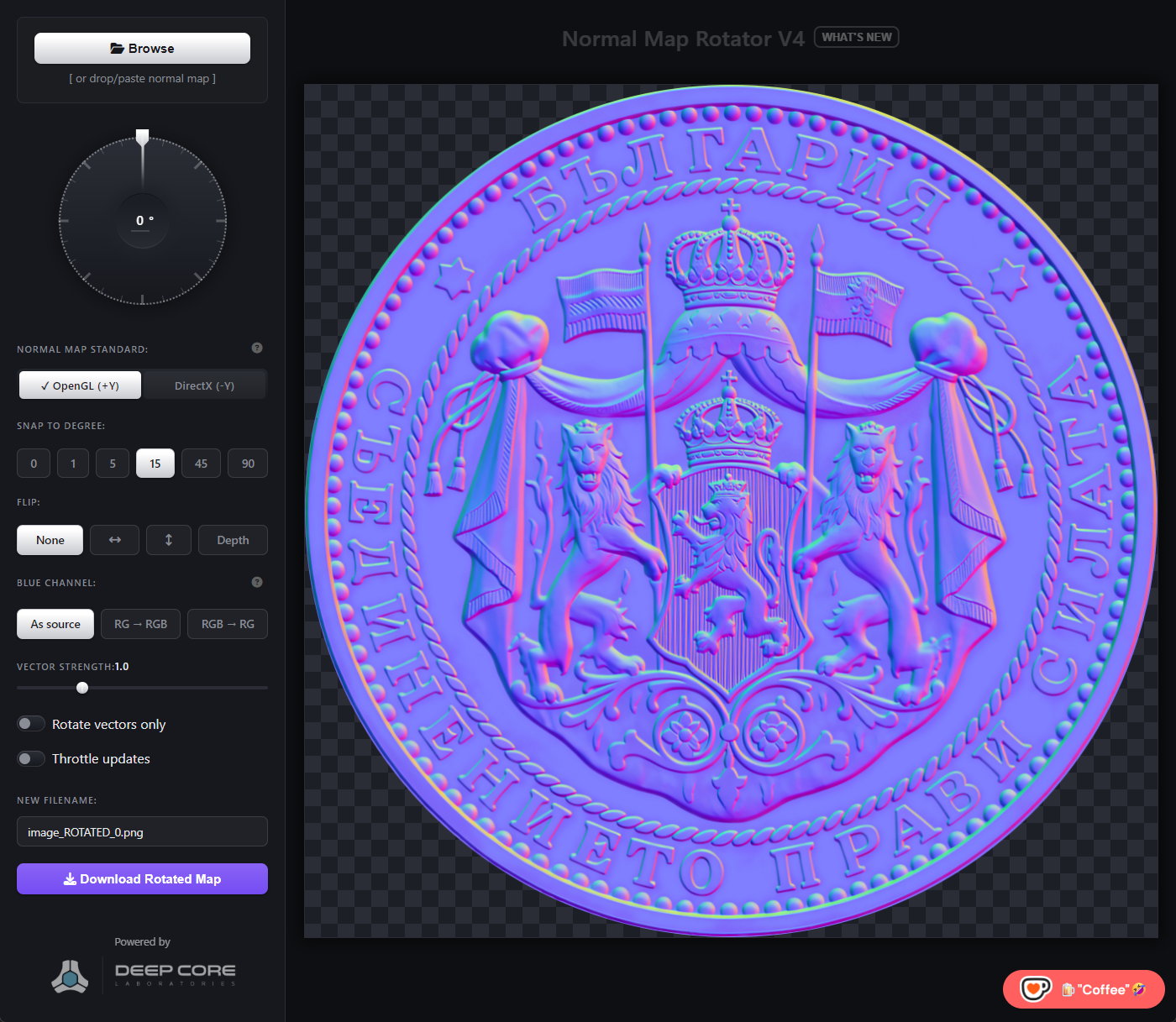
- Full OpenGL / DirectX standard support, with auto-detection and a reference table for 20+ engines
- New blue channel modes for working with RG/BC5-style maps
- Rotation is now pixel-accurate — no more jagged edges, no more scaling drift on export
- A redesigned dark UI with a proper rotation dial, flip controls, angle snapping, and paste-to-load
Here’s the full breakdown.
Bring in almost anything
Previously you could only load formats the browser natively understands (PNG, JPG, WebP…). V4 decodes several more right on your machine:
- TGA and TIFF — decoded client-side, nothing uploaded to a converter first
- PSD — open the flattened composite, or pick specific layers to merge, with options to select all/visible/none and trim to opaque pixels only
On load, the tool also runs a quick sanity check on the image and gives you a heads-up if it looks like an RG/BC5 map with no blue data, a regular photo, grayscale art, or otherwise doesn’t look like a normal map at all — before you spend time rotating the wrong thing.
Getting the math right
This is still the heart of the tool, and it got more capable:
- OpenGL (+Y) vs. DirectX (-Y) — pick your target engine’s convention and rotation is computed with the correct handedness. A built-in reference table covers Unreal, Unity, Blender, Maya, Substance Painter, Marmoset, and a dozen more, so you don’t have to remember which is which.
- Auto-detection — the tool scans uploaded files for authoring-tool fingerprints (like DirectXTex) and switches the standard for you when it can tell.
- Blue channel modes — “As stored,” “RG → RGB” (reconstructs Z for BC5-style maps that don’t store blue), and “RGB → RG” (blanks blue back out). Handy if you’re moving textures between pipelines that disagree on this.
- No more jaggies — rotation now handles alpha correctly, so edges rotate smoothly instead of fringing.
- Pixel-exact exports — downloaded PNGs now match your source resolution exactly; they used to get inflated by display scaling.
A dial that actually feels like one
The whole interface got a pass:
- Dark theme throughout, with a rotation knob whose background stays still while just the indicator spins — much easier to track your angle at a glance
- Click the angle readout to type an exact value instead of dragging
- Angle snapping (0°, 1°, 5°, 15°, 45°, 90°) plus horizontal/vertical flip
- A vector-strength slider for dialing intensity up or down, with a reset that only shows up when you’ve actually changed it
- Drop, browse, or paste an image straight from your clipboard
- Toast notifications instead of blocking alert popups
Try it
The tool is free and runs entirely in your browser: Normal Map Rotator Tool V4 (Online)
As always — if you hit a format it doesn’t handle or a standard it gets wrong, let me know.
If the tool saves you some time and you’d like to support development, consider buying me a “coffee”
Special thanks to the one person who donated! You are the best! Cheers! 🍻 🙏🏻